
Flamingo Float AI: Turn One Photo Into a Viral Rooftop Pool Drift
Upload one portrait and the AI places you on a giant pink flamingo float in a Dubai skyline infinity pool, lets the float drift toward the edge and pulls the camera back as a hand pushes you away from the drop.
STUDIO WORKBENCH
By uploading, you confirm you're 18+, have permission to use this photo (no celebrities), and agree to our Terms of Service and Privacy Policy.
Watch Flamingo Float AI Videos From the Edge of the Sky
Three characters, one rooftop infinity pool: a black-tee drifter, a can-in-hand lounger and an orange-hoodie rider, all floating on the same pink flamingo toward the same impossible drop.
What Is the Flamingo Float Trend and Where Did It Come From?
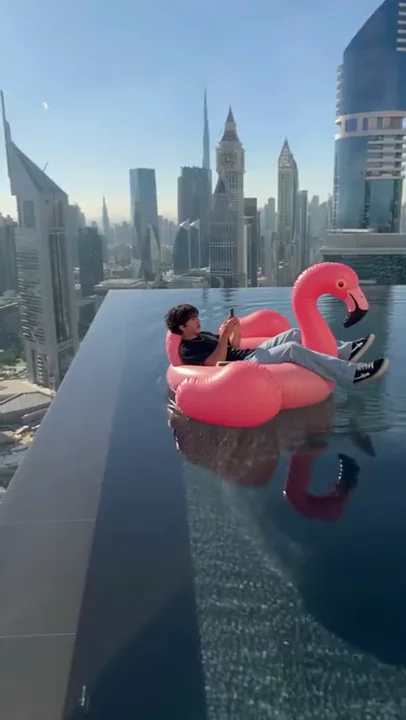
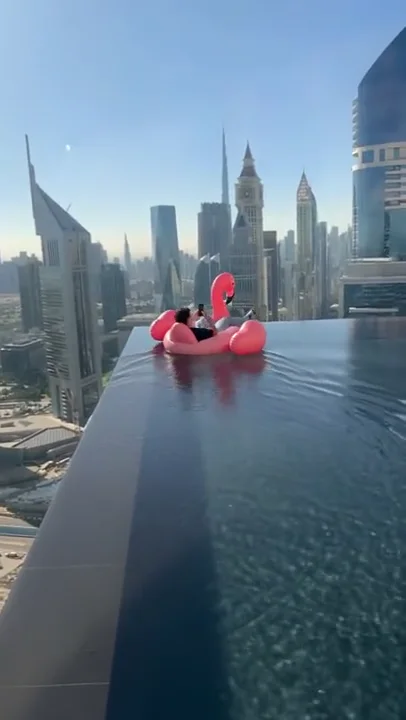
The clip runs about 11 seconds and needs no explanation. A character lies on a pink inflatable flamingo in a rooftop infinity pool, phone in hand, completely relaxed. The water carries the float toward the rim, where the pool appears to end in open sky above the city. At the last moment a hand enters the frame, shoves the float back toward safety, and a voice says thank you as if this were a normal favor between friends. The joke is the collision of luxury and danger: the calmest vacation pose in the world, parked on the edge of a thousand-foot drop.
The format has collected several names: Flamingo Float AI, Flamingo Float Trend, Infinity Pool Flamingo, Rooftop Pool AI Trend and Hey Bro Thank You Bro. That last name comes from the sound design, a short exchange built around hey bro and thank you bro. The audio is an original sound rather than a named release, and the spoken lines matter more than any music bed.
The commonly cited timeline starts on October 29, 2026, when Instagram creator @cain.aii posted an early AI concept of a pink flamingo float moving along a high-rise infinity-pool edge in Singapore. That clip established the core visual language: the rooftop pool, the pink float, the sheer drop and the sight of something that should not be able to happen. It did not yet include the rescue gag that made the format travel.
On November 2, 2026, @youneszarou posted the version titled Thank you bro on TikTok and Instagram. It added the missing piece: a hand reaches in and pushes the float away from the edge, and the rider answers with a casual thank you bro. Public trend trackers recorded roughly 27.6 million TikTok plays, about 2 million TikTok likes and around 3.1 million Instagram likes by November 6, 2026. Those figures are third-party estimates and change over time, so treat them as reported momentum rather than live numbers.
Templating followed quickly. Trend trackers recorded dedicated Flamingo Float templates by November 3, generator pages from several AI video tools by November 4 and 5, and a settled keyword set by November 6 and 7. One detail matters for reading the trend correctly: the original viral version is pushed back to safety. Clips where the float slides over the edge or falls are later variants, not the source. The recognizable beat is rescue, not disaster.
This template is the one-photo version of that structure. It keeps the rooftop infinity pool, the pink flamingo, the skyline and the hand-push beat, then casts your portrait into the rider position. The camera starts high and wide over the water, drifts closer as the float nears the rim, and pulls back at the end so the whole dizzying setting lands at once.
How One Photo Becomes a Rooftop Flamingo Float Video
The pipeline reads the face, hair, body type and outfit in your portrait, seats that identity on the pink flamingo float, rebuilds the rooftop infinity pool and Dubai skyline, and reproduces the drift, the hand push and the camera pull-back on the same 11-second timeline.
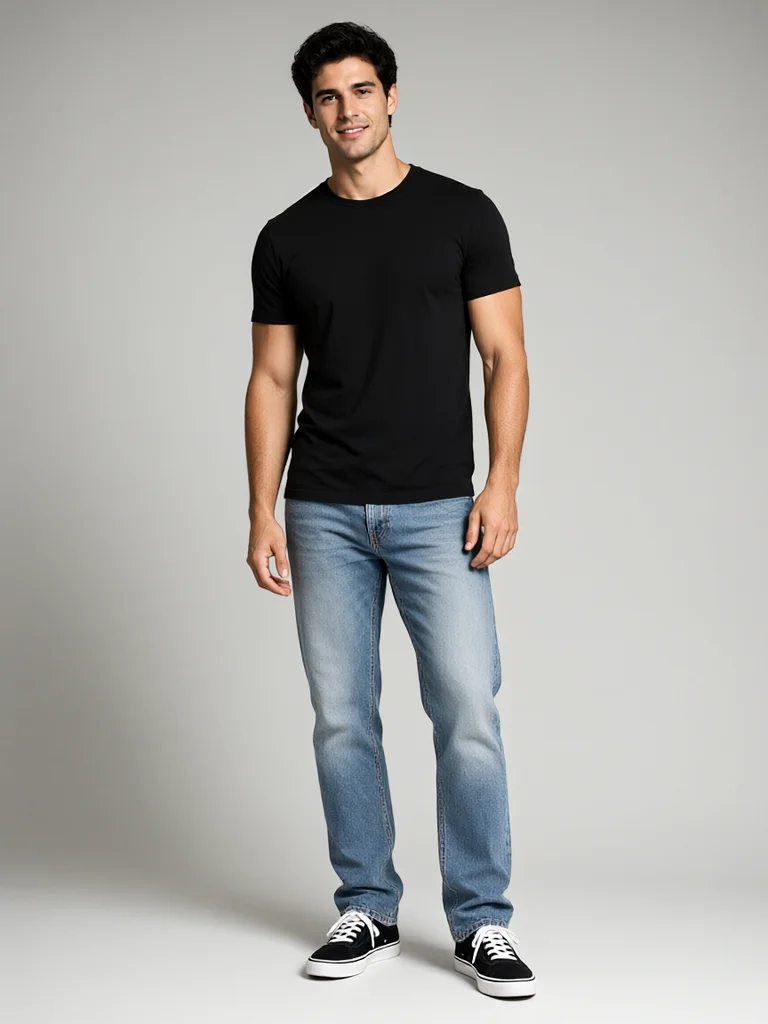
Who Can Star in Your Flamingo Float AI Video?
Anyone with one clear portrait can ride the float, from a champagne-in-hand influencer and a suited executive to a pet in sunglasses and a Hawaiian shirt.
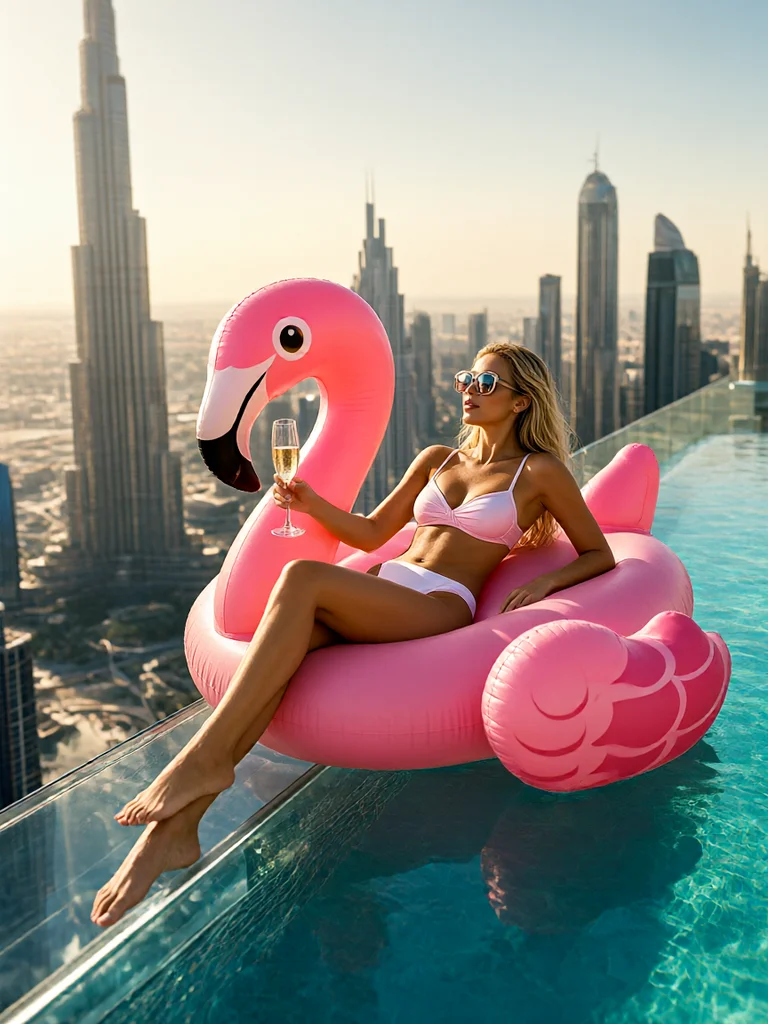
DUBAI INFINITY POOL CHIC INFLUENCER
A glamorous luxury influencer woman in stylish white swimwear and oversized sunglasses lounges on the giant pink flamingo float, holding a glass of champagne as it drifts toward the sheer edge of the rooftop pool before the Burj Khalifa.
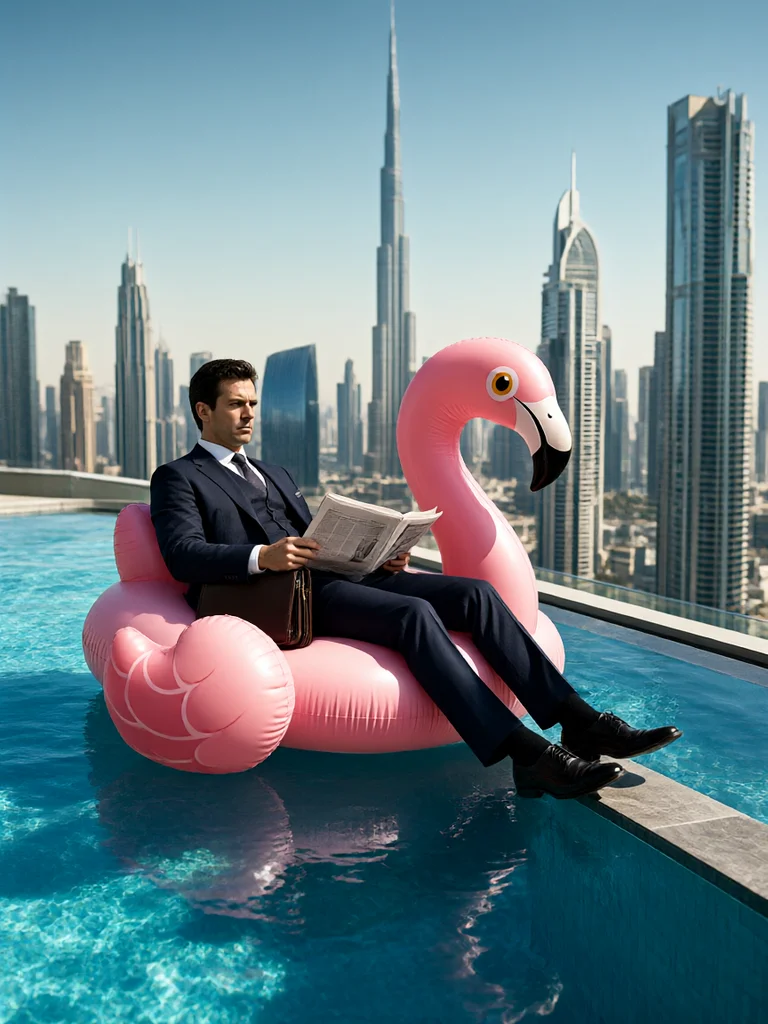
SUITED BUSINESSMAN SKYLINE FLOATER
A sharp corporate executive in a tailored navy three-piece suit and tie lies perfectly straight on the pink flamingo float, calmly reading a newspaper with his briefcase on his lap as he drifts toward the infinity-pool drop-off.
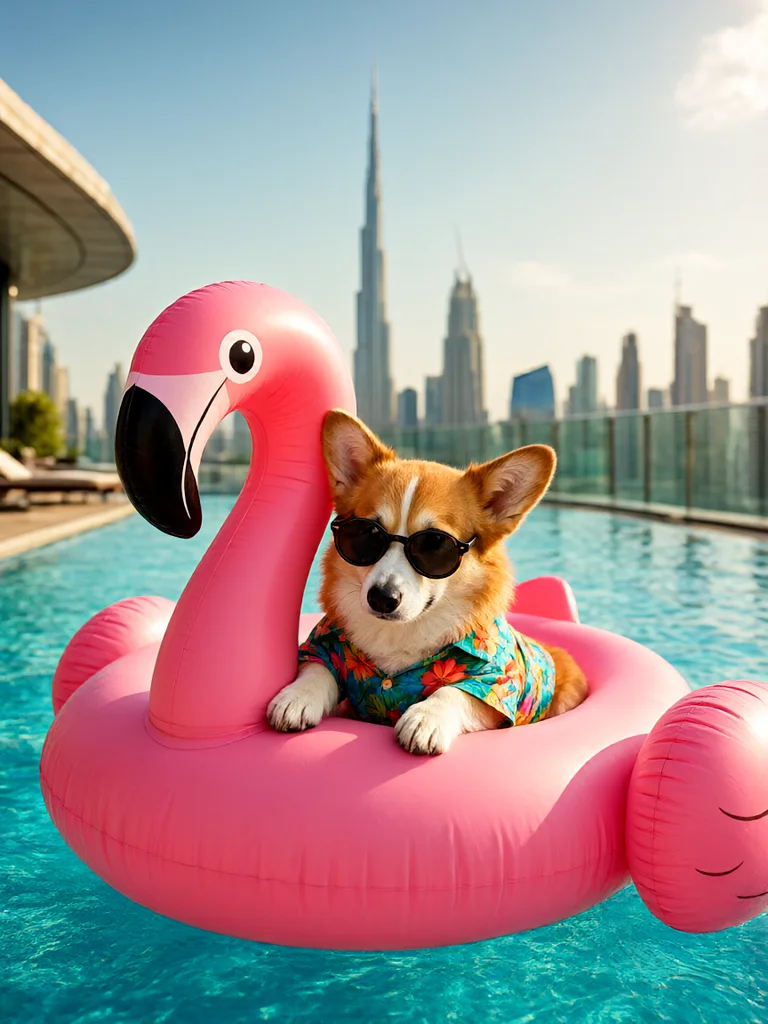
SUMMER CORGI SUNGLASSES VACATION
An adorable fluffy Corgi wearing tiny round sunglasses and a vibrant Hawaiian floral shirt relaxes on the giant pink flamingo float, both paws on the neck, overlooking the sunny Dubai skyline.
What Happens in the 11-Second Flamingo Float AI Video? Shot by Shot
The clip moves through four beats: a wide rooftop establishing shot, the float drifting toward the rim as a hand appears, the push that turns the float away, and a pulled-back final frame over the skyline.
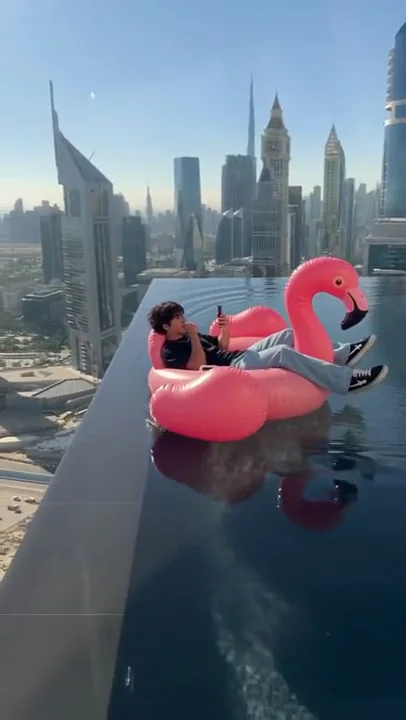
The Rooftop Wide Shot
The video opens high above a rooftop infinity pool that seems to spill straight into the Dubai skyline. A character in a black tee and light-wash jeans lies back on a pink flamingo float, phone in hand, while the Burj Khalifa and the tower cluster rise behind the water.
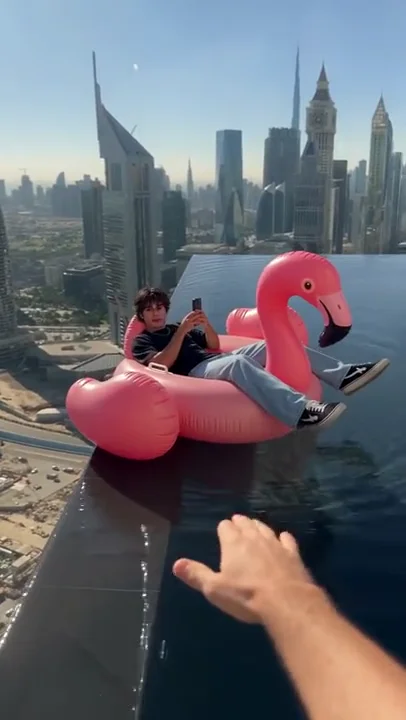
The Drift Toward the Edge
The camera settles lower and closer as the float creeps toward the rim. The rider is still absorbed in the phone, one sneaker crossed over the float, and a bare hand enters from the bottom right of the frame, reaching for the inflatable.
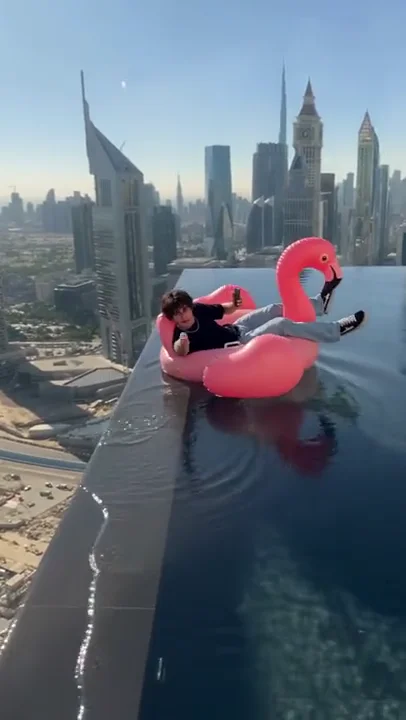
The Hand Push
The hand catches the float and pushes it back from the drop-off. The flamingo swings away from the edge, the rider shifts and lifts a hand in a relaxed thank-you gesture, and the water ripples across the dark reflective surface.
The Pull-Back Over the Skyline
The camera rises and pulls away, shrinking the float to a pink dot near the pool rim. The whole rooftop tray, the glass edge and the dense Dubai skyline fill the frame, and the clip ends on the calm after the rescue rather than on a fall.
How to Make a Flamingo Float AI Video in 3 Steps
Upload one portrait, pick a resolution tier and generate a finished 11-second vertical clip with the rooftop pool, the drift, the hand push and the synchronized audio already built in.
Upload One Character Photo
Add a clear, front-facing portrait of the person or pet who should ride the float. Bright, even light and a readable face and outfit give the cleanest identity match.
Pick Your Resolution Tier
Choose standard 480P (45 credits), 720P HD (90 credits) or 1080P Ultra (180 credits) depending on where you plan to post the clip.
Generate and Download
Hit generate and the cloud pipeline rebuilds the rooftop pool and skyline, places your identity on the flamingo and renders the drift, the hand push and the pull-back with the original audio. Download the watermark-free MP4 and post it.
Photo Tips for a Cleaner Flamingo Float AI Video
Use one sharp, evenly lit, front-facing portrait so the identity holds up while the rider lies back, turns toward the rescue hand and shrinks into the wide final shot.
Recommended Best Practices
Show the full head and body
The rider is framed from above and from the side, so a clear face plus a visible outfit keeps the character recognizable on the float.
Use even, natural light
Soft front light keeps skin tones and clothing colors stable against bright pool reflections and the hazy city behind.
Keep the expression relaxed and confident
The scene works because the rider looks unbothered, so a calm face gives the pipeline a clean reference for the casual thank-you beat.
Wear visible, distinctive clothing
Solid colors, swimwear, suits or a statement hoodie transfer cleanly and separate the rider from the pink float and blue water.
What to Avoid
Avoid sunglasses and face masks
Covered eyes remove the landmarks needed for the glance, the relaxed expression and the identity match.
Do not use group photos
Several faces make it unclear who should be on the float. Use one clear subject per generation.
Avoid heavy filters and stickers
Aggressive smoothing or AR overlays distort natural contours and can flicker as the head turns during the push.
Skip low-resolution screenshots
Compressed chat-app images lose fine detail and weaken the match, especially in the wide final frame.
Flamingo Float AI Video Pricing and Credit Packs
Pay once, create when the trend peaks. Credits never expire, and failed generations are refunded automatically.
Starter
Makes 1× 480P standard video
Creator
Makes 1× 720P HD (or up to 3× 480P)
Studio
Makes 1× 1080P Ultra (or up to 6× 480P)
Frequently Asked Questions About Flamingo Float AI
Everything you need to know about pricing, music sync, video duration, and photo compatibility.
A generation costs 45 credits at standard 480P, 90 credits at 720P HD and 180 credits at 1080P Ultra.
One-time packs start at 6.99달러 for 50 credits, with larger Creator and Studio packs available and no subscription.
Ready to Float Over the Dubai Skyline?
Upload one portrait and let the AI put you on the pink flamingo, drift you toward the edge of a rooftop infinity pool and pull the camera back as your rescue arrives.
No credit card required to explore • Instant cloud access
Disclaimer: This service is an independent AI generative parody and meme creation tool for transformative entertainment and commentary purposes. It is not affiliated with, endorsed by, or sponsored by any artist, record label, or music publisher. All musical elements and choreography are generated under transformative fair use principles.